Mario Electronic Store
Mouse with LED Screen & Knob Control Best for gaming
Couldn't load pickup availability
\n \n
Product description
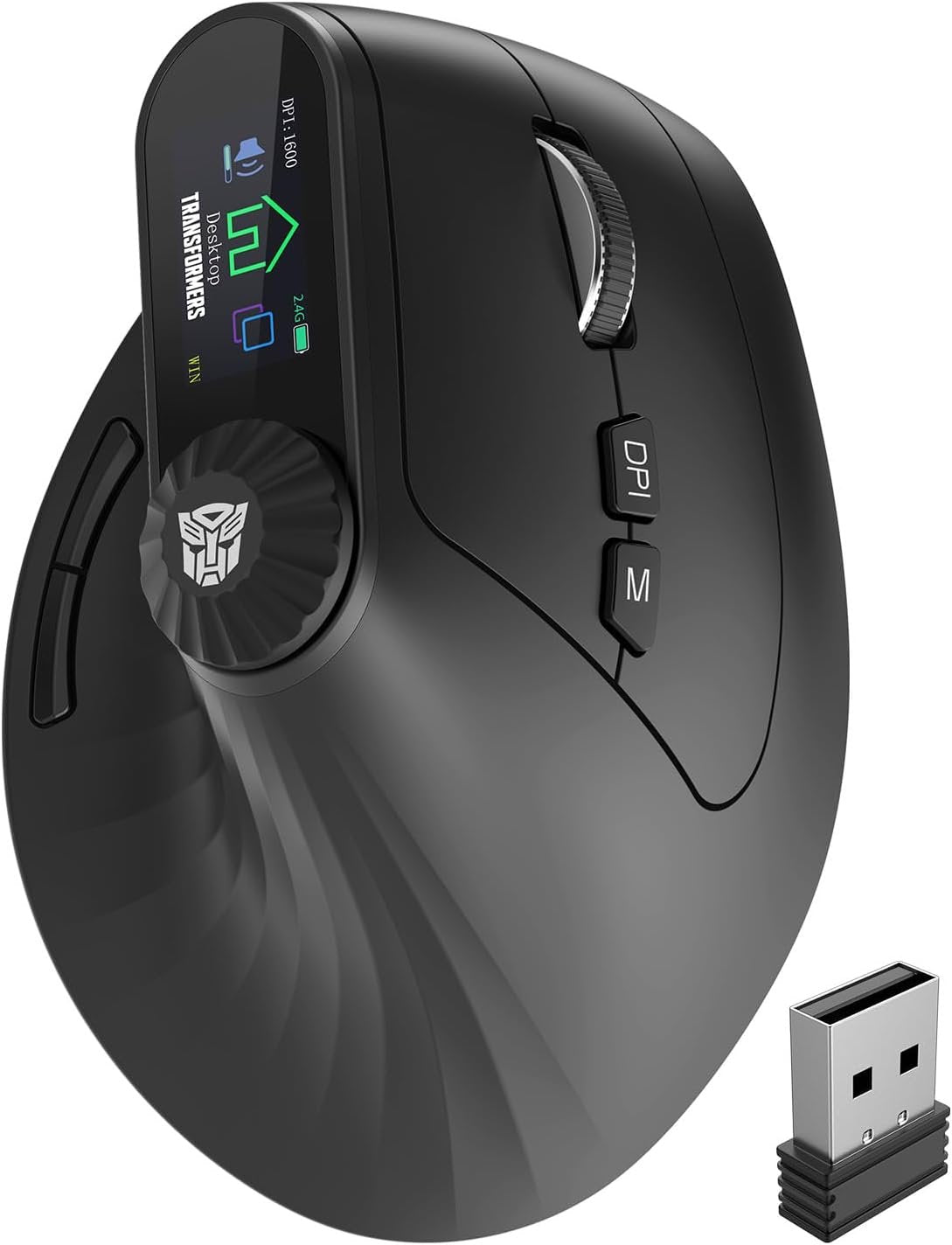
\nTransformers Ergonomic Rechargeable Mouse with LED Screen
\n
3-Device Connectivity: 2.4 GHz + Dual Bluetooth
\n
- \n
- \n\n\n
\n\n\n\n\n\n\n\n\n\n57° Vertical Ergonomic Mouse
\n\n\nErgonomic design for smoother movement and reduced strain on wrist
\n \n \n - \n\n\n
\n
- \n
- \n
- \n

- \n
- \n
- \n
- \n
- \n
Why does the ergonomic mouse feel uncomfortable?
\n \n \n1.Transitioning from a traditional mouse to an ergonomic design may require a 3-7 day adaptation period.
\n2.Please adjust your grip so your palm fits naturally against the curve of the mouse; this helps minimize hand fatigue.
\n \n - \n
Why is the wireless mouse not working?
\n \n \n1.Turn on the power switch.
\n2.Replug the USB receiver or restart the computer.
\n3.Recharge the battery.
\n4.Long press the DPI button to switch Windows/Mac mode.
\n \n - \n
Why does the mouse disconnect, lag or lack precision?
\n \n \n1.Recharge the mouse.
\n2.Use within 10 meters of the computer.
\n3.Avoid strong wireless interference.
\n4.Re-pair: long press the M button for 5 seconds, then reconnect the receiver (2.4G) or re-pair via Bluetooth.
\n \n - \n
How do I switch between 2.4G and Bluetooth modes?
\n \n \nDouble-click the M Button to cycle through 2.4G, BT1, and BT2 modes
\n \n - \n
Why are some functions unavailable on my Apple computer,and why is the scroll wheel direction reversed?
\n \n \nDue to systemn incompatibility, please long press the DPl button to switch between Windows and Mac modes.
\n \n
Product Gallery
\n


Product Specifications
\n| Connectivity Technology | \n2.4G Hz, Bluetooth | \n
| Additional Features | \nErgonomic Design, Rechargeable, Volume Control, Wireless | \n
| Movement Detection | \nOptical | \n
| Button Quantity | \n10 | \n
| Hand Orientation | \nRight | \n
| Compatible Devices | \nPersonal Computer, Tablet | \n
| Operating System | \nMac, Windows | \n
| Number of Batteries | \n1 Nonstandard Battery batteries required. (included) | \n
| Hardware Platform | \nMac, PC | \n
| Power Source | \nBattery Powered | \n
| Mouse Maximum Sensitivity | \n4000 Dots per Inch | \n
| Range | \n10 meters | \n
| Color | \nBlack | \n
| Style Name | \nModern | \n
| Enclosure Material | \nPlastic | \n
| Brand | \nTransformers | \n
| Model Name | \nTF-VM01-B | \n
| Antenna Location | \nGaming, Office | \n
| Model Number | \nTF-VM01 | \n
| Built-In Media | \nTF-VM01 Wireless Vertical Mouse*1, USB Type-C Cable, USB Wireless Dongle, User manual and warranty card | \n
| Are Batteries Included | \nYes | \n
| Are Batteries Required | \nYes | \n
| Manufacturer | \nTRANSFORMERS | \n
| Warranty Description | \n1 year | \n
| Best Sellers Rank | \n#398 in Computer Mice | \n
| ASIN | \nB0FS1WLY9K | \n
| Customer Reviews | \n4.2 4.2 out of 5 stars \n \n(79) \n \nvar dpAcrHasRegisteredArcLinkClickAction; \nP.when('A', 'ready').execute(function(A) { \nif (dpAcrHasRegisteredArcLinkClickAction !== true) { \ndpAcrHasRegisteredArcLinkClickAction = true; \nA.declarative( \n'acrLink-click-metrics', 'click', \n{ "allowLinkDefault": true }, \nfunction (event) { \nif (window.ue) { \nue.count("acrLinkClickCount", (ue.count("acrLinkClickCount") || 0) + 1); \n} \n} \n); \n} \n}); \n \nP.when('A', 'cf').execute(function(A) { \nA.declarative('acrStarsLink-click-metrics', 'click', { "allowLinkDefault" : true }, function(event){ \nif(window.ue) { \nue.count("acrStarsLinkWithPopoverClickCount", (ue.count("acrStarsLinkWithPopoverClickCount") || 0) + 1); \n} \n}); \n}); \n \n4.2 out of 5 stars | \n
| Item Weight | \n103 Grams | \n
| Item Dimensions L x W | \n4.54"L x 3.22"W | \n
| Unit Count | \n1.0 Count | \n
| Feature | \năVertical Ergonomic MouseăFeaturing an ergonomic 57° tilt angle, this mouse naturally conforms to the contours of the right hand, maintaining a relaxed hand position that effectively prevents wrist fatigue for extended work sessions. Note: A 3-7 day adaptation period is needed when switching from a traditional mouse. Adjust your grip to fit the mouseâs curve for optimal comfort. | \n
| Feature | \năLED Screen DisplayăThe Wireless Vertical Mouse Real-time updates of DPI, battery level, and connection mode are displayed on the screen without requiring additional drivers. The innovative knob offers exceptional efficiency for tasks such as zooming, horizontal scrolling, and volume adjustmentâmaking it ideal for accelerating design work in CAD or Photoshop and managing complex spreadsheets. | \n
| Feature | \nă6-Level DPI AdjustmentăThis vertical mouse wireless features six DPI settings (800/1600/2400/2800/3200/4000) for effortless switching to accommodate design work, office tasks, web browsing, and light gaming. Note: The buttons are non-programmable, and the forward/back navigation keys are not compatible with Mac OS. | \n
| Feature | \năThree-Device ConnectivityăThis wireless ergonomic mouse features a dual-mode design with 2.4G + Dual Bluetooth 5.0 connectivity, enabling seamless connection to up to three devices. Compatible with Windows and Mac OS systems, it works with desktop computers, laptops, tablets, and more. | \n
| Feature | \năRechargeable Ergonomic Mouse BluetoothăSay goodbye to disposable batteries. This Bluetooth vertical mouse features a built-in 500mAh lithium-ion battery that charges conveniently via the included Type-C cable. Additionally, the silent mouse supports button wake-up functionality and an auto-sleep mode to effectively conserve power. | \n
| Feature | \năUltra-quiet Ergonomic Wireless MouseăThis USB vertical ergonomic mouse features a silent button design that delivers soft, tactile click feedback, eliminating the noise typically associated with traditional mouse clicks. It is ideal for libraries, late-night work, important meetings, and shared spaces. | \n
Share